

Your Success, Our Mission!
6000+ Careers Transformed.
Explanation
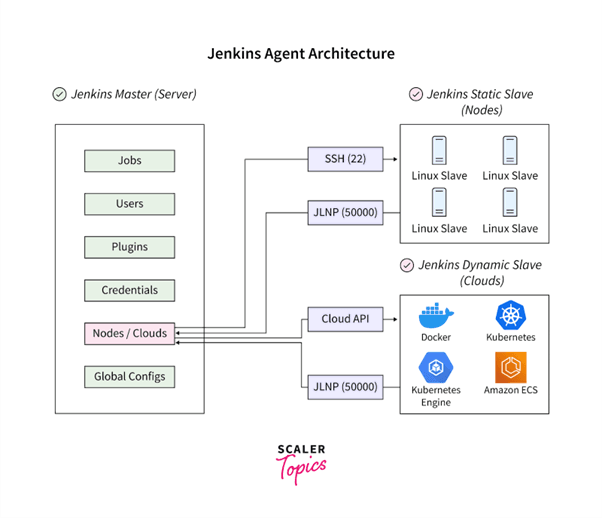
Jenkins is an open-source automation server widely used to implement continuous integration workflows. Its architecture follows a controller–agent model, where the controller manages job scheduling, configuration, and plugins, while agents execute build tasks on different environments. Jenkins pipelines define build logic as code, enabling versioned, repeatable automation. The extensible plugin ecosystem allows integration with version control systems, build tools, testing frameworks, container platforms, and cloud services. Jenkins supports distributed builds, parallel execution, and robust credential management to scale CI workloads reliably.
Table
| Component | Role |
|---|---|
| Controller | Orchestrates jobs and pipelines |
| Agent | Executes build steps |
| Pipeline | CI workflow as code |
| Plugins | Tool integrations |
| Credentials | Secure secrets handling |
Example
A team configures Jenkins to trigger builds on every code commit. The controller schedules jobs across multiple agents to run tests in parallel. Pipeline definitions are stored with the codebase to ensure consistency. Plugins integrate test reports and notifications. Failed builds alert developers immediately. Build times decrease while reliability improves.
Use Cases
• Automated builds and tests
• Distributed and parallel CI workloads
• Toolchain integration via plugins
• Pipeline-as-code implementations
Explanation
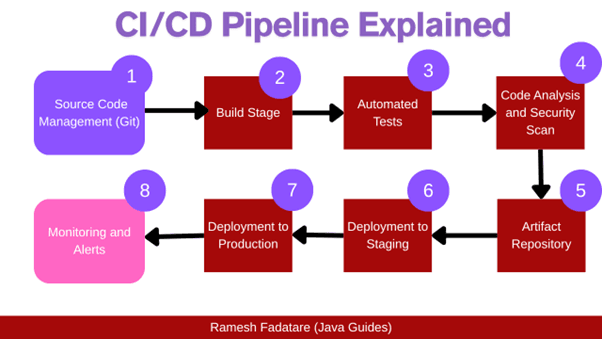
Pipeline as Code defines CI workflows using configuration files stored alongside the application source code. This approach treats pipelines like software: versioned, reviewed, tested, and auditable. Pipelines typically include stages for checkout, build, test, analysis, and artifact creation. Declarative syntax improves readability and standardization, while imperative steps allow flexibility when needed. Pipeline as Code enables reproducibility across environments and simplifies onboarding by making CI behavior explicit and transparent.
Table
| Stage | Purpose |
|---|---|
| Checkout | Fetch source code |
| Build | Compile/package |
| Test | Automated validation |
| Analyze | Quality/security checks |
| Publish | Artifact storage |
Example
A repository includes a pipeline definition file that specifies build and test stages. Every pull request triggers the same pipeline, ensuring consistent validation. Changes to the pipeline go through code review. Rollbacks are easy by reverting the pipeline file. Teams maintain standardized CI behavior across projects.
Use Cases
• Reproducible CI workflows
• Auditable automation changes
• Standardized pipelines across teams
• Faster onboarding and maintenance
Top Tutorials

GATE 2026 Data Science and AI
Explore this free tutorial to understand various concepts of GATE Data Science and AI 2026 . Learn probability, algebra, calculus, etc.

ChatGPT
In this ChatGPT tutorial, learn how to use ChatGPT effectively. Master the art of conversational AI with our step-by-step lessons. Start to learn ChatGPT today!

Artificial Intelligence
Dive into our comprehensive Artificial Intelligence tutorial and master the fundamentals of AI. From an introduction to advanced concepts, learn AI from scratch

 in Bengaluru, India



All Courses (6)
Master's Degree (2)
Professional Certifications (4)
Ideal for working professionals and graduates
Outcomes: 5-40 LPA Job + Masters Degree

 Build Automation


 in Bengaluru, India