

Your Success, Our Mission!
6000+ Careers Transformed.
Explanation
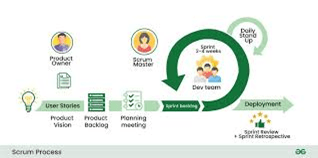
Continuous planning and development form the foundation of the DevOps lifecycle. Work is planned in small, incremental units using Agile methodologies to enable rapid feedback and adaptability. Version control systems act as the single source of truth for code, configurations, and documentation. Every change is tracked, reviewed, and reversible, which supports collaboration across distributed teams. Continuous planning aligns business goals with technical execution, while development practices emphasize small, frequent commits to reduce risk and improve quality.
Table
| Practice | Purpose |
|---|---|
| Agile Sprints | Incremental delivery |
| Backlog Grooming | Priority alignment |
| Version Control | Change tracking |
| Branching Strategy | Parallel development |
| Code Reviews | Quality assurance |
Example
A product team plans features in two-week sprints. Developers create feature branches and commit changes frequently. Pull requests trigger peer reviews before merging into the main branch. Product owners adjust priorities based on feedback. Issues are identified early due to small change sets. The team maintains steady progress with minimal rework.
Use Cases
• Agile software teams
• Distributed development teams
• Rapid feature iteration
• Controlled code collaboration
Explanation
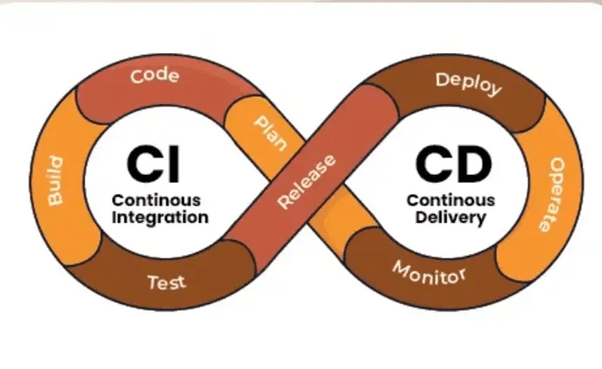
Continuous Integration (CI) is the practice of automatically building and testing code every time changes are committed to the repository. CI pipelines validate code through compilation, unit tests, static analysis, and security checks. The goal is to detect issues early, reduce integration conflicts, and maintain a deployable codebase at all times. Best practices include frequent commits, fast-running tests, pipeline-as-code, and immediate feedback to developers. CI establishes confidence that the software is stable before it progresses to delivery or deployment stages.
Table
| CI Stage | Function |
|---|---|
| Source | Code commit trigger |
| Build | Compile/package code |
| Test | Automated validation |
| Analysis | Quality and security checks |
| Artifact | Versioned output |
Example
A developer pushes code to the repository. The CI pipeline automatically starts, compiling the application and running unit tests. A failed test immediately notifies the developer. The issue is fixed and recommitted within minutes. Successful builds produce versioned artifacts ready for deployment. Integration problems are eliminated before reaching production.
Use Cases
• Automated build validation
• Early defect detection
• Stable main branch maintenance
• Faster development feedback loops
Top Tutorials

GATE 2026 Data Science and AI
Explore this free tutorial to understand various concepts of GATE Data Science and AI 2026 . Learn probability, algebra, calculus, etc.

ChatGPT
In this ChatGPT tutorial, learn how to use ChatGPT effectively. Master the art of conversational AI with our step-by-step lessons. Start to learn ChatGPT today!

Artificial Intelligence
Dive into our comprehensive Artificial Intelligence tutorial and master the fundamentals of AI. From an introduction to advanced concepts, learn AI from scratch

 in Bengaluru, India



All Courses (6)
Master's Degree (2)
Professional Certifications (4)
Ideal for working professionals and graduates
Outcomes: 5-40 LPA Job + Masters Degree

 Continuous Planning and Development


 in Bengaluru, India