

Your Success, Our Mission!
6000+ Careers Transformed.
After building APIs, the next step is to package and deploy your model efficiently. This chapter covers containerization using Docker, orchestration using Kubernetes, and deploying models to the cloud. You’ll learn how containers simplify deployment, ensure consistency across environments, and scale efficiently. By the end, you will understand how to take a trained model, wrap it in a container, and deploy it to production for real-world use.
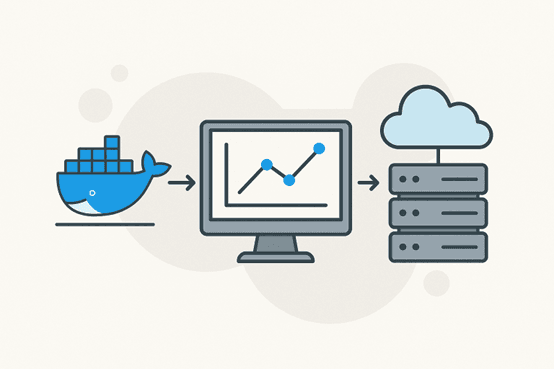
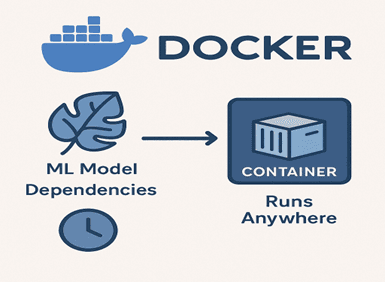
Docker is a platform that allows you to package your application, dependencies, and environment into a single container. This ensures your ML model runs consistently across different machines and platforms.
Benefits of Docker:
- Eliminates environment mismatch issues.
- Ensures reproducibility.
- Simplifies scaling and cloud deployment.
Basic Docker Workflow for ML Models:
1. Write a Dockerfile specifying Python version, dependencies, and your API script.
2. Build a Docker image containing your model and API.
3. Run a Docker container locally or on a cloud server.
Example Dockerfile for Flask API:
# Base image
FROM python:3.10
# Set working directory
WORKDIR /app
# Copy requirements
COPY requirements.txt .
# Install dependencies
RUN pip install -r requirements.txt
# Copy code and model
COPY app.py model.pkl ./
# Expose port
EXPOSE 5000
# Run API
CMD ["python", "app.py"]
Commands:
docker build -t my-model-api .
docker run -p 5000:5000 my-model-api
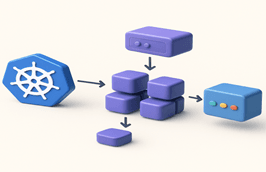
Kubernetes (K8s) is a container orchestration platform that manages deployment, scaling, and operation of containerized applications.
Why Kubernetes is used for ML Deployment:
- Automatically handles scaling based on traffic.
- Ensures high availability by restarting failed containers.
- Simplifies rolling updates and version control.
Basic Kubernetes Concepts:
- Pods: The smallest deployable unit, usually running a single container.
- Deployment: Manages pods and ensures desired state is maintained.
- Service: Exposes pods to the network or other services.
Example: Deploying a Dockerized model API to Kubernetes:
apiVersion: apps/v1
kind: Deployment
metadata:
 name: model-api
spec:
 replicas: 3
 selector:
   matchLabels:
     app: model-api
 template:
   metadata:
     labels:
       app: model-api
   spec:
     containers:
     - name: model-api
       image: my-model-api:latest
       ports:
       - containerPort: 5000
Advantages:
- Handles high traffic automatically.
- Provides monitoring, logging, and fault tolerance.
- Works seamlessly with cloud platforms.
After containerization, the next step is hosting your model in the cloud for real-world access.
Popular Cloud Platforms:
AWS: Use SageMaker, ECS, or EKS for containerized deployments.
Google Cloud: AI Platform or GKE for Kubernetes-managed deployment.
Azure: Azure ML and AKS for model serving at scale.
Steps for Cloud Deployment:
1. Push Docker image to cloud container registry.
2. Deploy container to cloud service or Kubernetes cluster.
3. Configure endpoints for your API.
4. Set up monitoring, logging, and auto-scaling.
Example Scenario:
Deploying a sentiment analysis model on AWS ECS with auto-scaling to handle thousands of requests per second.
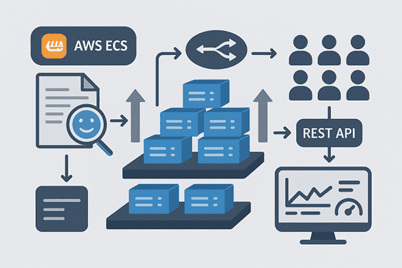
Deployment doesn’t end with making the model available; continuous monitoring is essential:
Key Practices:
- Track API request metrics, response times, and error rates.
- Monitor model predictions for data drift or concept drift.
- Maintain version control and implement rollbacks if needed.
- Automate retraining pipelines for models that degrade over time.
Example Tools:
- Prometheus and Grafana for monitoring.
- Cloud-native logging services (AWS CloudWatch, GCP Stackdriver).
Summary:
- Docker packages your model, dependencies, and API into a portable container.
- Kubernetes orchestrates containers, handling scaling, fault tolerance, and updates.
- Cloud deployment makes your model globally accessible with managed services and auto-scaling.
- Monitoring and maintenance ensure the deployed model continues to perform reliably over time.
With these steps, you can turn a trained ML model into a production-ready, scalable, and reliable service.
Top Tutorials

Python
Python is a popular and versatile programming language used for a wide variety of tasks, including web development, data analysis, artificial intelligence, and more.
SQL
The SQL for Beginners Tutorial is a concise and easy-to-follow guide designed for individuals new to Structured Query Language (SQL). It covers the fundamentals of SQL, a powerful programming language used for managing relational databases. The tutorial introduces key concepts such as creating, retrieving, updating, and deleting data in a database using SQL queries.
Data Science
Learn Data Science for free with our data science tutorial. Explore essential skills, tools, and techniques to master Data Science and kickstart your career

 in Bengaluru, India



All Courses (6)
Master's Degree (2)
Professional Certifications (4)
Ideal for working professionals and graduates
Outcomes: 5-40 LPA Job + Masters Degree

 Preparing Your Model


 in Bengaluru, India